
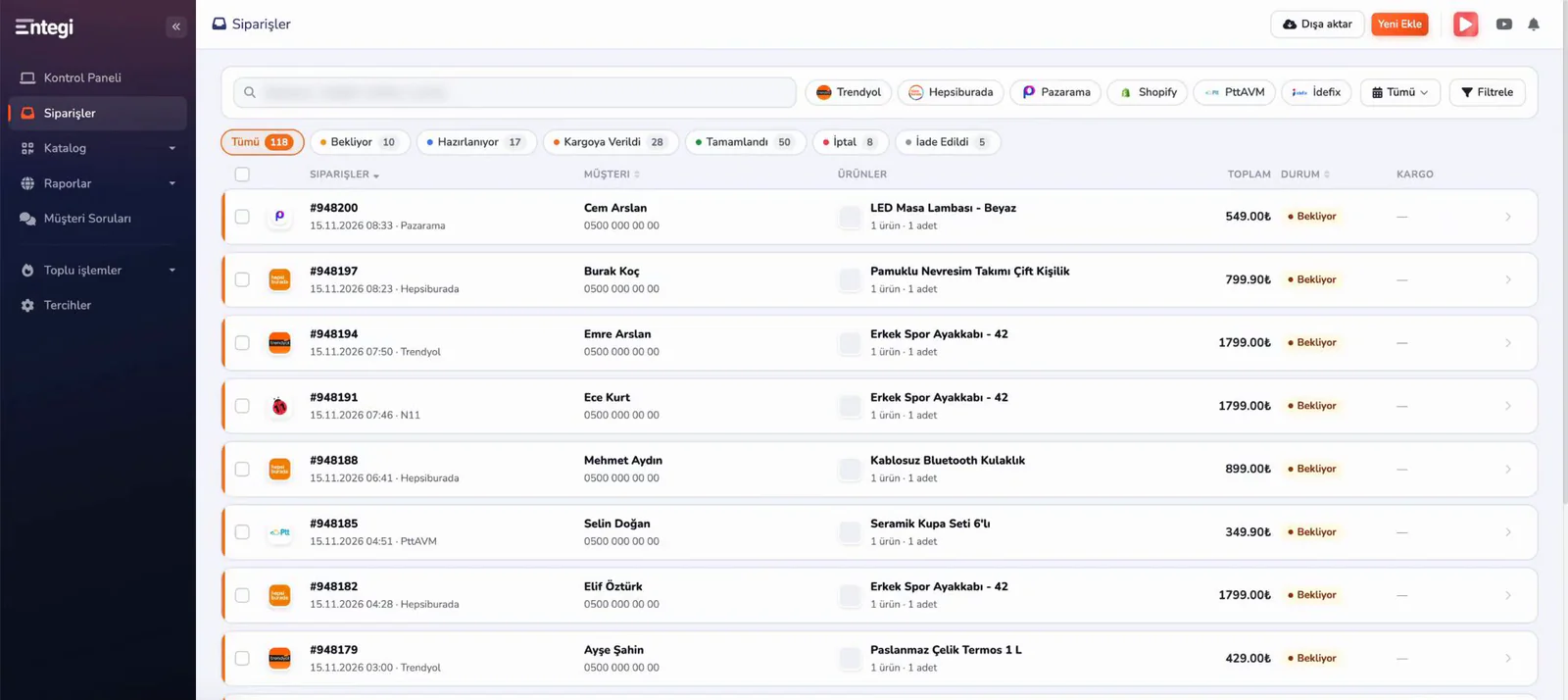
Orders on one screen
Orders of every marketplace gather on the orders page. You narrow the list by marketplace and status and create the cargo label from the order panel.
See order managementAfter your products are listed
Once your products are live on a marketplace, the daily work begins: preparing orders, keeping prices and stock up to date, following your profit. Entegi brings this work together in one panel for every marketplace.
7 days free, no credit card required
Marketplace solutions are the tools a business selling on several marketplaces uses to run the work that follows a listing from one panel: orders and shipping, marketplace-specific prices and stock, customer questions and sales reports. You handle all of it in one place instead of logging in to each seller panel.
Connecting your store and sending products to a marketplace is the job of marketplace integration. This page covers how you run the daily operations after sending in the Entegi panel.
Orders of every marketplace gather on the orders page. You narrow the list by marketplace and status and create the cargo label from the order panel.
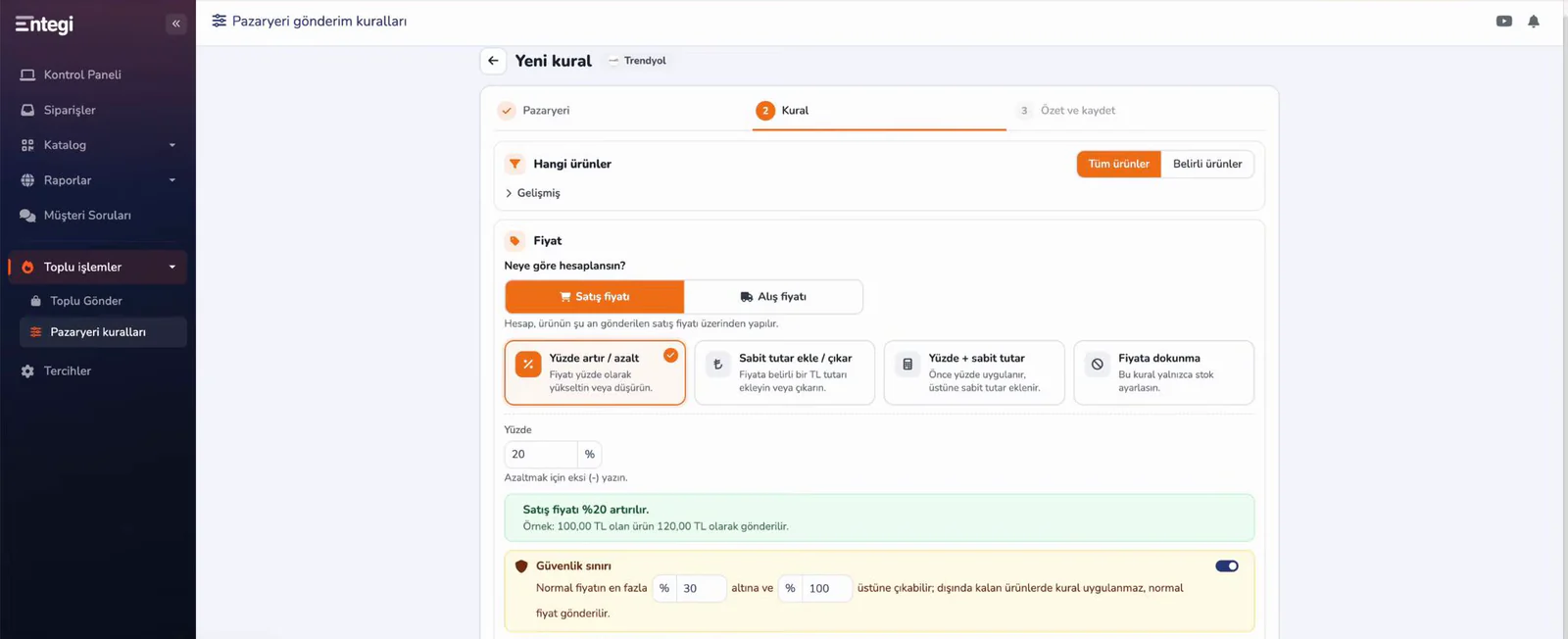
See order managementYou change the price sent to a marketplace by a percentage or a fixed amount, and the stock by adding to it or setting a fixed value. Before a rule goes live you see the products it affects.
See marketplace rulesGeneral reports show your sales by marketplace, product and period. In the Professional and Business plans, the profit report calculates your net profit from Trendyol settlement data.
See the profit reportThe daily flow has four steps. If your store is not connected yet, set up marketplace integration first.
On the orders page (Siparişler) you see the orders from every marketplace. You narrow the list with the marketplace buttons and status tabs.
Selecting an order opens the quick detail panel, where you create the cargo label. If you have an e-invoice integration, you issue the invoice from the panel too.
On the marketplace rules page (Pazaryeri Kuralları) you put the price and stock sent to a marketplace on rules. Before activating you see each product’s values before and after.
Under Reports (Raporlar) you see sales, order and product reports, and on the stock alerts page the products whose stock fell below your threshold.
Automatic stock and price updates, settlement reports and the profit report are included in the Professional and Business plans.
Watch the steps in the Entegi panel in short tutorial videos (in Turkish).
When an order comes in, the work between Entegi and the marketplace runs in this order.
Orders from marketplaces where order pulling is switched on land on the orders page with the Bekliyor (pending) status.
When you create the cargo label, the order moves to Hazırlanıyor (preparing). With integrated cargo companies, the shipped status updates on its own.
In the Professional and Business plans, stock and price changes are sent to the marketplaces automatically. Marketplace rules send each marketplace its own price.
Sales appear in the general reports broken down by marketplace. The net profit of your Trendyol sales is calculated from settlement data in the profit report.
Every operation in the table corresponds to a screen in use in the Entegi panel today.
| Operation | What it does | Where in the panel |
|---|---|---|
| Order list | Orders from every marketplace and your e-commerce site appear in one list with status tabs. | Siparişler |
| Cargo label | The cargo label is created from the order’s quick detail panel. | Siparişler > Hızlı detay paneli |
| Marketplace-based price | You enter a separate sale price and market price per marketplace for a single product. | Katalog > Tüm Ürünler > Ürün düzenleme |
| Price and stock rules | The price sent to a marketplace is set by a percentage or fixed amount, the stock by adding or a fixed value. | Toplu İşlemler > Pazaryeri Kuralları |
| Customer questions | Questions about your products on the marketplaces are collected and answered from the panel. | Müşteri Soruları |
| Stock alerts | Products whose stock fell below your threshold are listed. | Raporlar > Stok Uyarıları |
| Sales reports | Sales, orders and product performance appear by marketplace and period. | Raporlar > Genel Raporlar |
| Settlement and profit | Shows what the marketplace paid and deducted, and the net profit of your Trendyol sales. | Raporlar > Hakediş Raporları, Kâr Raporu |
Automatic stock and price updates and the settlement and profit reports are included in the Professional and Business plans.
A marketplace rule changes the price sent to the marketplace you choose by a percentage or a fixed amount. Your own price in the panel stays as it is.
The connection steps of each marketplace are on its own page.
Connect your marketplace store and bring your daily work into Entegi.
7 days free, no credit card required