İçeriğe geç
Comparison

Excel and manual management or marketplace integration?

On one marketplace with a few products Excel does the job; as marketplaces and products grow, you repeat the same stock, price and order work in every panel.

Try for Free

7 days free, no credit card required

The Entegi mascot turning away from a pile of spreadsheet printouts to show a tablet with stores linked to one hub, next to cards for stock, prices and orders in one place

The short answer

  • Excel and the seller panels need no extra software fee; on one marketplace with a small catalogue they can be enough.
  • With a second marketplace, every product, price and stock change is made separately in each panel. That is where errors come from.
  • An integration removes the repetition: you define the product once, see orders in one list and update stock and prices in one place.

How do the two methods handle the same tasks?

The left column describes working with seller panels and Excel sheets; the right column describes how the same task is done in Entegi.

Task-by-task comparison of Excel and manual management with marketplace integration
TaskExcel and manual managementMarketplace integration (Entegi)
Product listing You create the product in each marketplace’s seller panel or fill in that marketplace’s Excel template, choosing the category and attributes by hand every time. You add the product to the panel once. AI prepares the category, brand, attribute and variant matching; you check it and send it in 2 steps with Hızlı Gönder (Quick Send).
Stock updates After a sale on one marketplace you lower the stock in the other panels by hand. A late update can lead to selling a product you no longer have. A stock change in one sales channel is reflected to the others automatically. Automatic stock and price management is part of the Professional and Business plans.
Price updates You change the price in each panel separately. If prices differ by marketplace, you keep that calculation in another sheet. A price you change in the panel is sent to the marketplaces. Marketplace rules set a separate price per marketplace by a percentage or a fixed amount.
Order tracking You sign in to each seller panel and check for new orders panel by panel. You see the orders of every connected marketplace in one list and filter by marketplace and status.
Shipping labels You get the label from each marketplace panel or from the carrier’s own system. You connect your carrier once and create the label from the order screen.
Invoices You type the order details into your invoicing software by hand. With the e-invoice and accounting integration the order is passed on to the invoice. The accounting integrations you can use depend on the plan.
Net profit You take commission, shipping and deductions from the settlement statement and calculate net profit in a sheet yourself. The profit report deducts commission, shipping, deductions and product cost from your Trendyol settlement and shows net profit. It is part of the Professional and Business plans.
Customer questions You answer questions in each marketplace panel separately. You answer the questions from the marketplaces in one place.
Setup No setup; you start right away with tools you already know. You enter the API details from your marketplace seller panel and import your products with Excel or XML, or create them one by one in the panel.
Cost No extra software fee. The price is the time you spend on repeated work. There is a monthly plan fee. The Starter plan is ₺1,490 per month; the Professional plan, which includes automatic stock and price management and the profit report, is ₺2,990 per month. You try it free for 7 days and there is no commitment.

The right column describes what the Entegi panel does today; plan-dependent features are marked in their row. The left column describes a way of working, not a product.

Where does the difference show?

The rows of the table fall under four headings. For each one we look at where Excel is enough and where it struggles.

Time: how many times do you do the same task?

With manual management the workload is multiplied by the number of marketplaces. Changing a price is one action in one panel; on three marketplaces it is three actions, repeated for every new product.

With an integration you make the change once and the panel sends it to the connected marketplaces. The gain grows with the number of marketplaces and products; on one marketplace with a few products the difference is small.

Risk of error: stock and prices

If you sell the same stock on more than one marketplace, the other panels need an update after each sale. When the update is late you may take an order for a product you do not have, which can end in a cancellation.

An integration carries the stock change between channels itself; in Entegi this is part of the Professional and Business plans. Marketplace rules also have a safety limit: for a product that exceeds it the rule is not applied and the normal price is sent.

Visibility: revenue or net profit?

A seller panel shows you revenue. To see what is left after commission, shipping and deductions, you have to move the settlement statement into a sheet and calculate it yourself.

Entegi’s profit report does this from Trendyol settlement data and uses the purchase price you entered in the panel as the product cost. The report covers Trendyol settlements only and is part of the Professional and Business plans.

Cost: the software fee and the price of time

Excel has no visible fee, which is a real advantage for a seller who is just starting. The hidden cost is the hours spent on repeated tasks and the cancellations caused by wrong stock or prices.

An integration has a monthly fee. Decide by comparing that fee with the time you spend working by hand; in Entegi you can see this with your own products during the 7-day free trial.

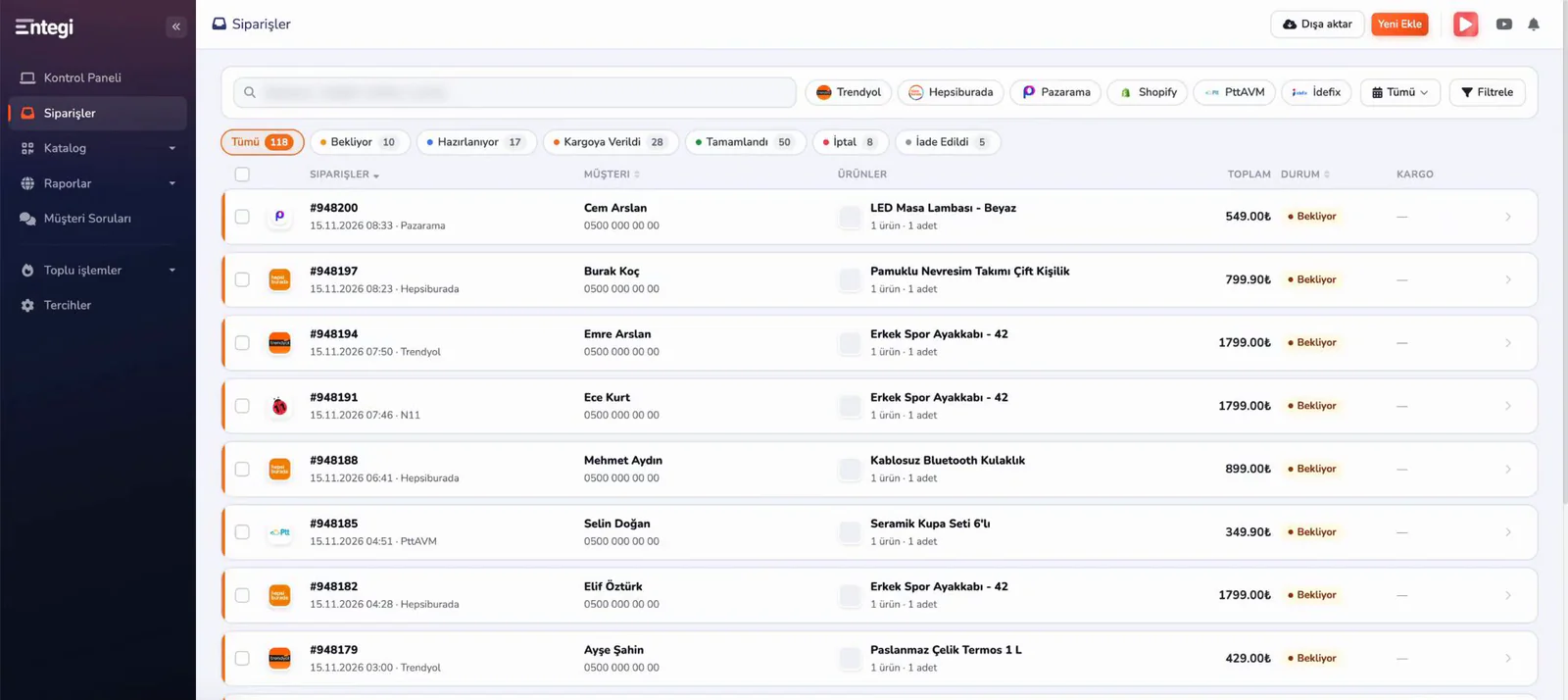
Orders from every marketplace in one list

In manual management the most time-consuming task is signing in to each panel to check for new orders. In Entegi the orders of the connected marketplaces arrive on the same screen.

  • Filter orders by marketplace and status.
  • Open the order details without leaving the list.
  • Create the shipping label from the order screen.
Entegi orders screen with orders from several marketplaces in a single list

Which one suits whom?

Not every seller needs an integration from day one. The two lists below help you see where you stand.

Excel and manual management can be enough

  • You sell on one marketplace and do not plan to open a second.
  • Your catalogue is small and prices and stock rarely change.
  • You can follow your orders comfortably in a single panel.

It is time for an integration

  • You have opened a second marketplace or are about to.
  • You sell the same stock in more than one channel.
  • You change prices often or set different prices per marketplace.
  • You want to see how much of your revenue you keep.

How do you move from Excel to Entegi?

You do not have to give up your Excel file; your product list is where the move starts.

  1. Connect your marketplace

    Enter the API details from your marketplace seller panel into Entegi.

  2. Import your products

    Import products in bulk with Excel or XML, or create them one by one in the panel.

  3. Check and send

    Review the matching prepared by AI and send the product to the marketplace with Hızlı Gönder (Quick Send).

Frequently asked questions

Marketplace integration is software that lets you list your products on marketplaces such as Trendyol, Hepsiburada and N11, keep stock and prices in sync and manage orders from a single panel. Instead of signing in to each seller panel, you do the work once and the panel sends it to the connected marketplaces.

How to choose integration software

The criteria to compare software by and a checklist to use during a trial.

Read the selection guide

Profit report

Net profit left after commission, shipping and deductions are taken from your Trendyol settlement.

Explore the profit report

Plans and prices

The prices of the three plans and which feature belongs to which plan.

See plans and prices

See the difference with your own products

Connect your marketplace, import your products and send the first one in 2 steps. All marketplaces are available during the trial.

Try for Free

7 days free, no credit card required

7 days free, no credit card required Try for Free