



Lost products in their own list
The Rakipte (competitor) filter gathers the products whose BuyBox is held by another seller. You can also search by product name, variant or barcode.
BuyBox status of your Trendyol products
Entegi scans your products on Trendyol at regular intervals and shows in one list who holds the BuyBox. Each row shows your rank, the BuyBox price, your own price and the difference.
7 days free, no credit card required

BuyBox tracking means watching which seller the marketplace gives the “Add to Cart” button to when several sellers offer the same product. If you do not hold the BuyBox, the competing seller takes most of the sales from that product page. Entegi shows this for your Trendyol products on Katalog > Buybox.
The BuyBox price is the price of the seller holding the BuyBox at that moment. Entegi writes it next to your price and calculates the difference, so you see product by product how far behind you are.
The Rakipte (competitor) filter gathers the products whose BuyBox is held by another seller. You can also search by product name, variant or barcode.
Each row shows the BuyBox price, your price and the difference. For products held by a competitor, the difference is shown in red.
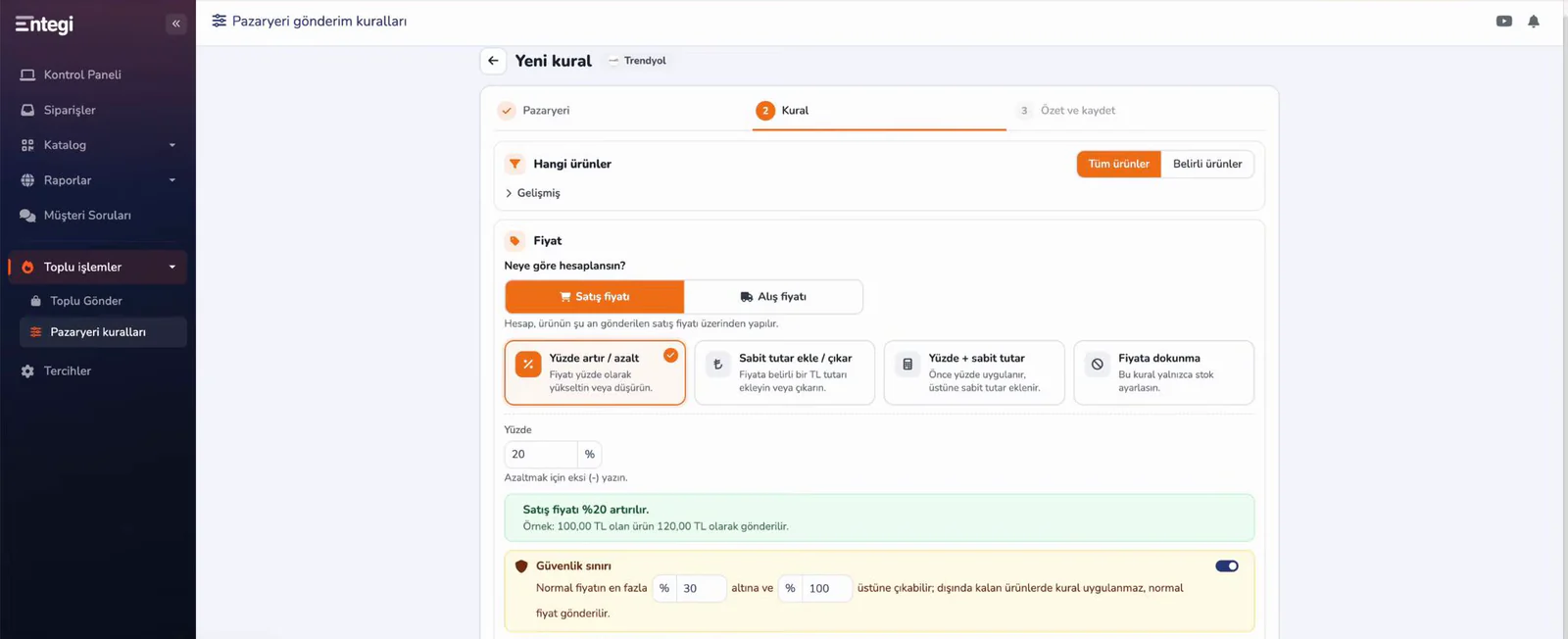
You change the price of products held by a competitor on the product page, or with marketplace rules that set the price sent to Trendyol.
See marketplace rulesWith your Trendyol store connected, BuyBox tracking turns on with a single switch in the Trendyol settings.
On the Preferences (Tercihler) page, press Edit next to Trendyol and switch on Buybox izleme (Buybox tracking). The Trendyol settings link at the top right of the Buybox page opens the same form.
Your products are scanned automatically. When the first scan is complete, the results appear on Katalog > Buybox.
Each row shows your rank, the state, the BuyBox price, your price and the difference. Use the Rakipte filter to list only the products where you lost the BuyBox.
Looking at the difference, change your price on the product page or with marketplace rules. To check one product again right away, press the refresh icon at the end of its row.
Variants that are not listed or not on sale on Trendyol are not in the BuyBox race; they are added to the list automatically once approved and on sale.
Watch the steps in the Entegi panel in short tutorial videos (in Turkish).
Once tracking is on, BuyBox data reaches the panel in this order.
Your Trendyol products are scanned at regular intervals. The time of the last check is shown at the top right of the page.
Based on the data Trendyol shares, Entegi records for each product whether you or a competitor hold the BuyBox and what rank you are in.
The gap between the BuyBox price and your price is written on the row. By default the list shows competitor-held products first, largest difference on top.
You decide which product’s price to change. You make the change on the product page or with marketplace rules.
Each operation in the table matches a screen in use in the Entegi panel today.
| Operation | What it does | Where in the panel |
|---|---|---|
| Switch tracking on and off | Starts or stops the BuyBox scan of your Trendyol catalog. | Tercihler > Trendyol > Düzenle |
| BuyBox list | Shows rank, state, BuyBox price, your price, difference and last check time for each product. | Katalog > Buybox |
| Filter by held and lost | Narrows the list to products where you or a competitor hold the BuyBox. | Buybox > Tümü, Buybox sizde, Rakipte |
| Product search | Searches by product name, variant or barcode. | Buybox > Search box |
| Check one product again | Queries the BuyBox state of the chosen product again. | Buybox > Refresh icon at the end of the row |
| Rescan the whole catalog | Rescans your whole Trendyol catalog without waiting for the next scheduled scan. | Buybox > Kataloğu şimdi tara |
| Set the price with a rule | Sets the price sent to Trendyol by a percentage or a fixed amount for the products you choose. | Toplu İşlemler > Pazaryeri Kuralları |
BuyBox tracking is included in the Professional and Business plans.
On the marketplace rules page you tie the price sent to Trendyol to a rule for chosen products. A rule changes only the price sent to the marketplace; your own price in the panel stays as it is.
BuyBox tracking works with your Trendyol store. You connect the other marketplaces on the Preferences page as well.
Connect your Trendyol store, switch on Buybox tracking and follow competitor-held products in one list.
7 days free, no credit card required