İçeriğe geç
Selection guide

How to choose marketplace integration software

The software that fits you supports the marketplaces you sell on, lists a product with little effort and has a total cost you know in advance.

Try for Free

7 days free, no credit card required

The Entegi mascot checking a list with a magnifying glass, next to cards for scope, effort and total cost

The short answer

  • Write down your own needs first: which marketplaces, how many products, which carrier and accounting software.
  • Compare software in a trial with your own product, not on a marketing page.
  • Look at total cost, not only the plan price: limits, extra fees, commitment and cancellation terms.

Which criteria matter when you choose integration software?

There are eight criteria. For each one we wrote why it matters and which question to ask the vendor. Ask every vendor the same questions; putting the answers side by side makes the decision easier.

Selection criteria for marketplace integration software, why they matter and the questions to ask a vendor
CriterionWhy does it matter?Ask the vendor
Supported marketplaces and connections If the software does not support the marketplace you sell on, its other features do not matter. The same goes for your carrier, your accounting software and your e-commerce site. Are all the marketplaces I sell on, and plan to open, supported? Which plan includes the shipping, e-invoice and e-commerce site connections?
Product listing and matching Every marketplace has its own category and attribute list. Most of the time spent on a listing goes into this matching, and the gap grows with your catalogue. Do I match category, brand and attributes myself, or does the software suggest them? How many steps does it take to send one product to a marketplace?
Stock and price sync If you sell the same stock in more than one channel, a late stock update leads to selling a product you do not have. How long does a sale in one channel take to reach the stock of the others? Can I set a different price and stock per marketplace?
Order, shipping and invoice flow Most of the daily work is orders. If orders, shipping labels and invoices are not in one flow, you carry data between tools by hand. Do I see the orders of all marketplaces in one list? Can I create the shipping label and the invoice from the same screen?
Reporting and net profit Revenue does not show earnings. If you cannot see what is left after commission, shipping and deductions, you do not know which product makes a profit. Do the reports show revenue only, or do they calculate net profit too? Which marketplaces’ settlement data is the calculation based on?
Pricing and limits The plan price alone does not show total cost. Product, order, store and user limits and extra fees change the bill. Are the prices published on the site? Which limits apply and what happens when I exceed one? Is there a setup fee or a commission on sales?
Trial and commitment terms You cannot tell whether software fits your business without trying it with your own products. A long commitment raises the price of a wrong choice. Is there a free trial, is a credit card required and which features are available in it? Is there a commitment, and how do I cancel?
Support and training You need help during setup and whenever a marketplace changes one of its rules. The support channel and hours have to match the pace of your business. Through which channel and during which hours do I reach support? Can I get help with setup, and are there tutorial videos and documentation?

The criteria are not listed in order of importance. Which one weighs most depends on the number of marketplaces you sell on, your catalogue and your team.

How do you evaluate the criteria?

The eight criteria come down to four questions. For each one we briefly explain what to watch for.

Scope: does it cover your business?

Scope is the first filter. Remove any software that does not support your marketplaces, your carrier and your invoicing software; there is no need to look at the remaining criteria.

Think about a year from now as well as today. If you plan to open a new marketplace or build your own e-commerce site, find out now which plan includes those connections.

Effort: how long does a listing take?

Feature lists on marketing pages look alike. The way to see the difference is to send one of your own products to a marketplace from start to finish during a trial.

Watch how many screens you go through, who matches the categories and attributes, and whether you can see the reason in the panel when the marketplace rejects a product.

Visibility: can you see what you earn?

Most software reports order counts and revenue. The figure that helps you decide is the amount left after commission, shipping and deductions.

If there is a net profit report, ask what data it is based on. Profit calculated from settlement data is not the same as profit calculated from an estimated commission rate.

Cost: what will you pay in total?

When you compare plans, put the same scope side by side: which plan has the connections and limits you need, and what are its monthly and yearly amounts?

Look at the exit terms too. The commitment period, the way to cancel, the refund terms and whether you can export your product and order data when you leave matter as much as the price.

Where does Entegi stand on these criteria?

Entegi prepared this guide, so we give our own answers openly against the same criteria. You can verify the ones about marketplace connections and product listing yourself during the trial; plan-dependent features such as accounting and e-commerce site integrations are not part of the trial.

  • Marketplaces: Trendyol, Hepsiburada, N11, Amazon, Çiçeksepeti, Pazarama, PttAVM, Idefix and Akakçe.
  • Listing: AI prepares the category, brand, attribute and variant matching; it is included in every plan at no extra fee.
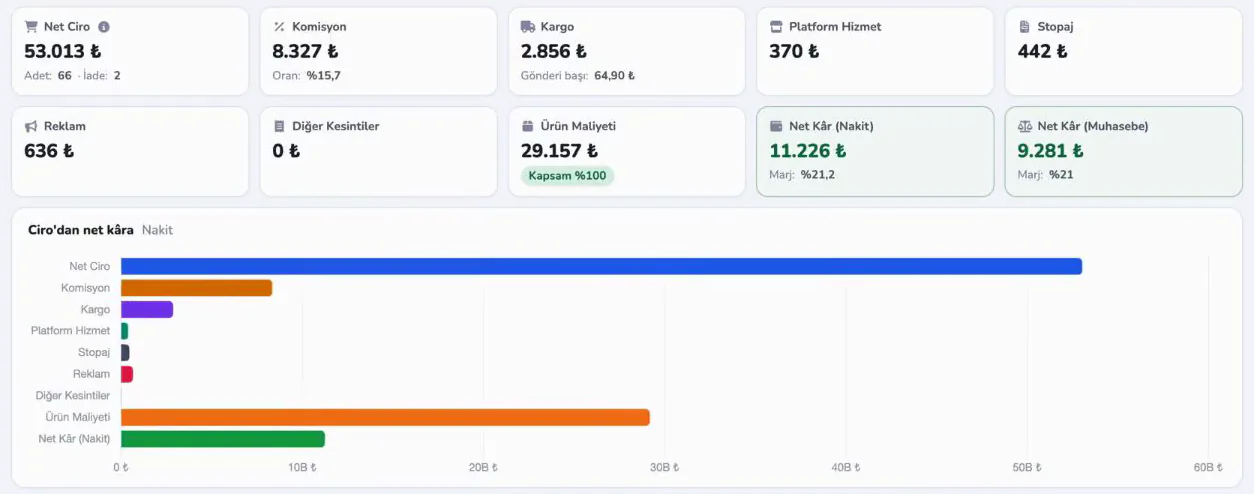
  • Net profit: the profit report is calculated from Trendyol settlement data; it is part of the Professional and Business plans.
Entegi profit report: net profit cards and chart calculated by deducting commission, shipping, deductions and product cost from revenue

What should you check before you decide?

Use the list while you evaluate a vendor. An item you cannot tick is a question to ask that vendor.

Your needs

Tests during the trial

Price and terms

Support and continuity

Your ticks are not saved; the list resets when you reload the page.

What are the steps to choose integration software?

There are four steps. The decision is usually made during the trial, not on the feature list.

  1. Write down your needs

    Put your marketplaces, product count, carrier and accounting software in one list.

  2. Make a shortlist

    Remove the software that does not support your marketplaces and connections.

  3. Try it with your own product

    In the trial, send one product and follow one order from start to finish.

  4. Compare total cost

    For the same scope, put the plan fee, the limits and the exit terms side by side.

Frequently asked questions

Marketplace integration software lets you list your products on more than one marketplace, keep stock and prices in sync and manage orders from a single panel. Instead of signing in to each seller panel, you do the work once and the software sends it to the connected marketplaces.

Excel or integration?

A task-by-task comparison of manual management with Excel and seller panels against marketplace integration.

Read the Excel comparison

Plans and prices

The prices of the three plans and which feature belongs to which plan.

See plans and prices

Run the checklist in Entegi

Connect your marketplace and run the product listing, stock and price update and order items of the list with your own products. All marketplaces are available during the trial; plan-dependent features such as accounting and e-commerce site integrations are not part of it.

Try for Free

7 days free, no credit card required

7 days free, no credit card required Try for Free