

Entegi does the matching
Category, required attributes, variants and brand are matched with their counterparts on the marketplace. The dialog prepares the product step by step.
Quick Send matches the category, attributes, variants and brand of your product with their marketplace counterparts; you check the summary and send.
7 days free, no credit card required

Listing a product on a marketplace means finding the counterpart of its category, required attributes, variants and brand on that marketplace. Quick Send takes over that work.
Category, required attributes, variants and brand are matched with their counterparts on the marketplace. The dialog prepares the product step by step.
When the product lacks a value the marketplace requires, the dialog asks you for it. You pick the value from a list and continue; the send resumes where it stopped.
The summary screen shows the selected category and brand. You correct what looks wrong with the Change link, then send.
When the preparation ends, the summary screen appears: category and brand are already matched, and you are the one who presses send.
Once your marketplace account is connected and your products are in the panel, this is what sending a product takes.
On the All Products page under Catalog, click the rows of the products you want to send. Press Quick Send in the action bar that appears at the bottom and choose the marketplace. Send to All sends the products to every connected marketplace together.
Entegi prepares the product and shows the summary screen. If the category and brand are correct, press the send button. The send starts.
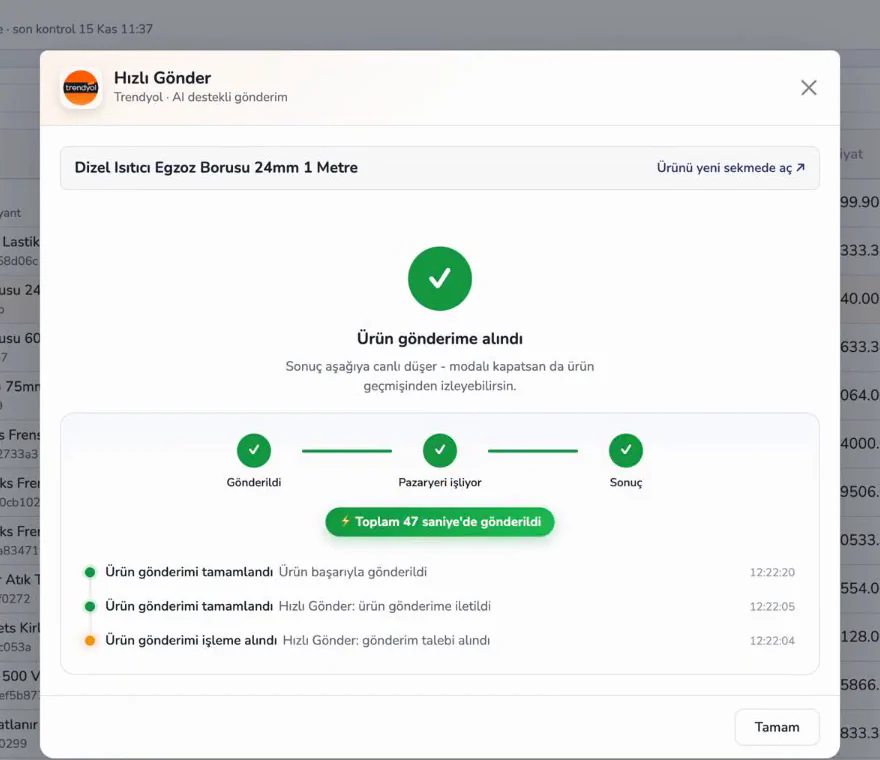
You do not need another screen to see the result.
When the product has been passed to the marketplace, the result shows up in the dialog. Once the marketplace has processed it, all three steps turn green.
On Trendyol the product appears in the seller panel, in the tab of products in the approval process, with the status awaiting approval, and goes on sale after Trendyol approves it.
You follow the result in the live activity feed on the dashboard. Errors also appear in the badge on the marketplace card.
The Marketplace Mappings screen shows the category, brand, attribute and variant counterparts for every connected marketplace. This is where you see unmatched records and correct them.
Watch the steps in the Entegi panel in short tutorial videos (in Turkish).
Connect your marketplace account, select a product and leave the matching to Entegi.
7 days free, no credit card required